手部坐标系(operator)
- 左手:掌背x正,指尖指向手腕z正,大拇指指向-y;
- 右手:掌背x正,指尖指向手腕z正,大拇指指向y正。
MANO convention
手腕指向指尖的方向为x正方向,大拇指指向z正方向,掌心朝向y正方向。(右手)
https://github.com/hassony2/manopth
mediapipe
landmarks: https://ai.google.dev/edge/mediapipe/solutions/vision/hand_landmarker
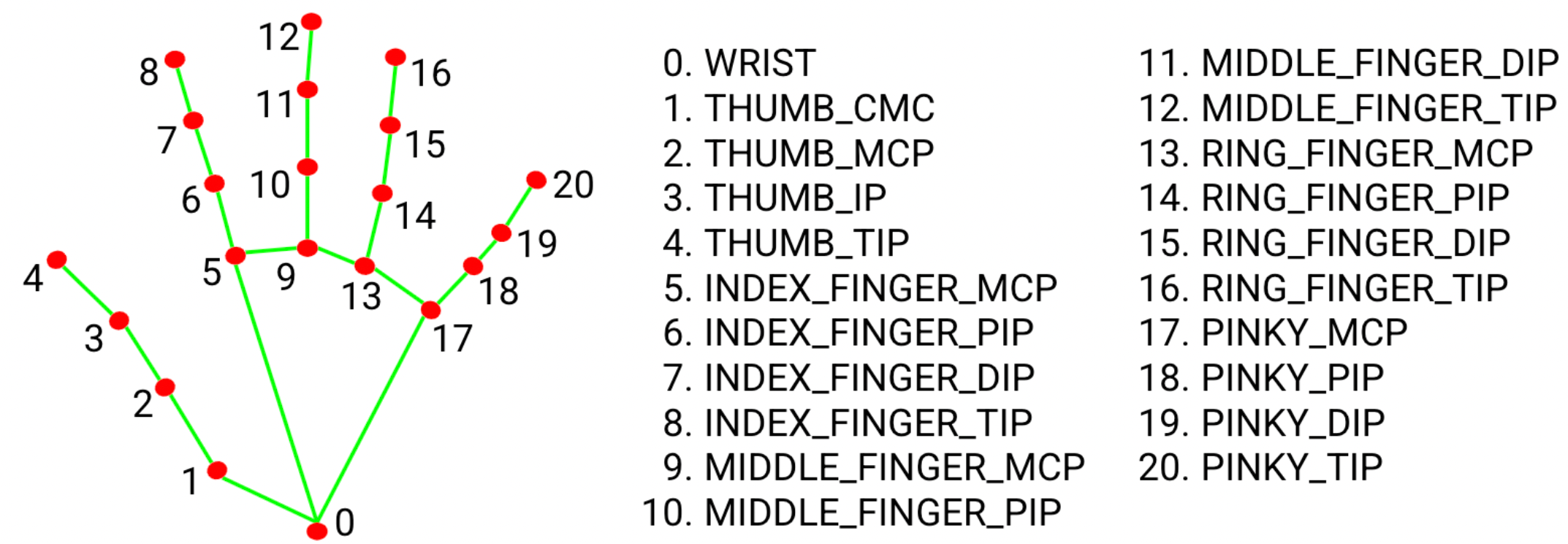
vuer
手部坐标系
- 左手:手背y正,手指指向手腕z正,大拇指指向x正;
- 右手:手背y正;手指指向手腕z正,大拇指指向-x。
web XR landmarks:https://docs.vuer.ai/en/latest/examples/19_hand_tracking.html
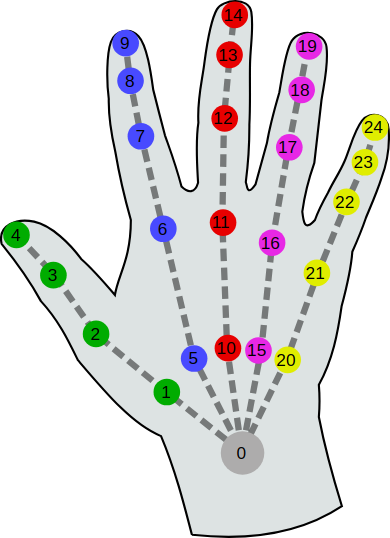
using uv install pin:
export LD_LIBRARY_PATH=$LD_LIBRARY_PATH:$HOME/workspace/src/dual_ur5_apps/.venv/lib/python3.10/site-packages/cmeel.prefix/lib
单图显示
版本vuer[all]==0.0.56
ImageBackground(
	display_image[:],
	format="jpeg",
	quality=20,
	key="head-image",
	interpolate=True,
	fixed=False,     # not fixed with world frame
	aspect=ratio,    # image width/height
	height=1,    # image height in XR world frame(unit maybe meter)
	distanceToCamera=2,    # image distance to headset(your eye/ head camera), only works with `fixed=False`
)
左右眼分离渲染
版本vuer[all]==0.0.56
session.upsert(

	[
		ImageBackground(
			display_image[::2, : width // 2],
			format="jpeg",
			quality=80,
			key="left-image",
			interpolate=True,
			fixed=True,    # fixed with world frame
			aspect=ratio,
			height=2,    # image height (might be in meter)
			position=[0, 0, -3],    # position relative to world frame, only works with `fixed=True`
			# rotation=[0, 0, 0],    # rotation relative to world frame, only works with `fixed=True`
			layers=1,    # left screen render only
		),

		ImageBackground(

			display_image[::2, width // 2:],
			format="jpeg",
			quality=80,
			key="right-image",
			interpolate=True,
			fixed=True,
			aspect=ratio,
			height=2,
			position=[0, 0, -3],
			# rotation=[0, 0, 0],
			layers=2,    # right screen render only

		),

	],

	to="bgChildren",

)
meta quest3 adb
sudo apt install android-tools-adb
adb start-server
adb reverse tcp:8012 tcp:8012